

The robots.txt line that does nothing for AI Overviews
You open ChatGPT and type: “how do I stop Google using my content in AI Overviews?” Back comes a confident answer. Add Google-Extended to your robots.txt. So you add it, push the file live, and wait. 3 months later your pages are still showing up in AI Overviews, because Google-Extended was never the setting that controlled them.
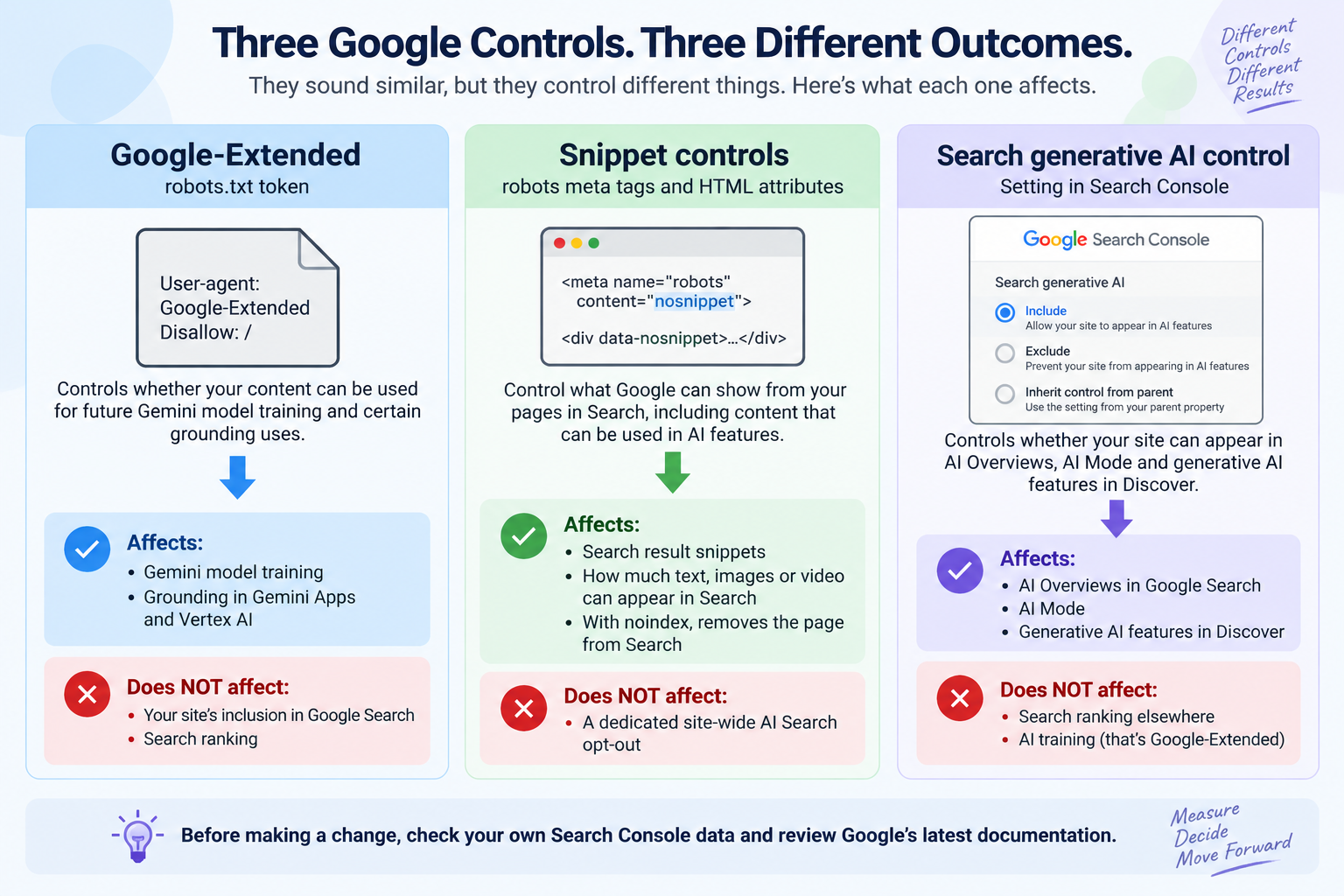
There are 3 separate controls here, and they sound similar enough to cause trouble. The confusing part is that the robots.txt token many people reach for controls a different Google product area, while the Search Console control is the one designed for Google’s generative AI features in Search.
Current as of September 2026: Google’s Search generative AI control has rolled out to all websites worldwide. The details below reflect Google’s documentation checked in September 2026. Check the linked Google documentation before changing any setting because these controls have changed during 2026.
What Google-Extended actually controls
Google-Extended controls whether content crawled from your site can be used for training future Gemini models and for grounding in Gemini Apps and Vertex AI, not whether your site appears in Google Search or AI Overviews.
Google describes Google-Extended as a separate product token for publishers. It can be used to manage whether content Google crawls from your site may be used for future Gemini model training and for grounding in Gemini Apps and with Google Search on Vertex AI. Google also states that Google-Extended does not affect a site’s inclusion in Google Search and is not a Google Search ranking signal.
If you find a line like this in your robots.txt file, you are looking at Google-Extended:
User-agent: Google-Extended
Disallow: /
That line controls Google-Extended’s use of crawled content. It is not an instruction to Google Search to remove your pages from AI Overviews.
If your actual goal is “do not let my pages appear in Google’s generative AI features in Search”, Google provides a separate Search Console control for that job. For the current definition and syntax, check Google’s documentation for Google-Extended.
Snippet controls: they work, and they hurt
Google’s snippet controls can limit what it shows from your pages in Search, including content that can be used in AI features.
The controls Google names for limiting what is shown from pages in Search include nosnippet, data-nosnippet, max-snippet and noindex. They are useful when you have a specific reason to restrict search previews, but they are much broader than a simple “turn off AI Overviews” switch.
| Control | What it affects | What it does not affect | Where you set it |
|---|---|---|---|
| Google-Extended | Use of crawled content for future Gemini model training and certain Gemini or Vertex AI grounding | Google Search inclusion and Search ranking | robots.txt |
| Snippet controls | What Google can show from your pages in Search, with noindex going further and removing a page from Search |
They are not a dedicated site-wide AI Search opt-out control | robots meta directives, HTML attributes, or related page controls |
| Search generative AI control | Whether your site can appear in AI Overviews, AI Mode and generative AI features in Discover | It does not affect Search ranking elsewhere or AI training | Search Console |
That difference matters because snippet controls act on Search as a whole. If you use a broad control to stop information from being shown in AI features, you can also change what people see in ordinary Search results. With noindex, the effect is much larger because the page is removed from Search rather than simply losing its preview.
Google’s documentation on AI features and your website explains the current Search controls and how they relate to AI Overviews and AI Mode.
The Search Console setting that does it properly
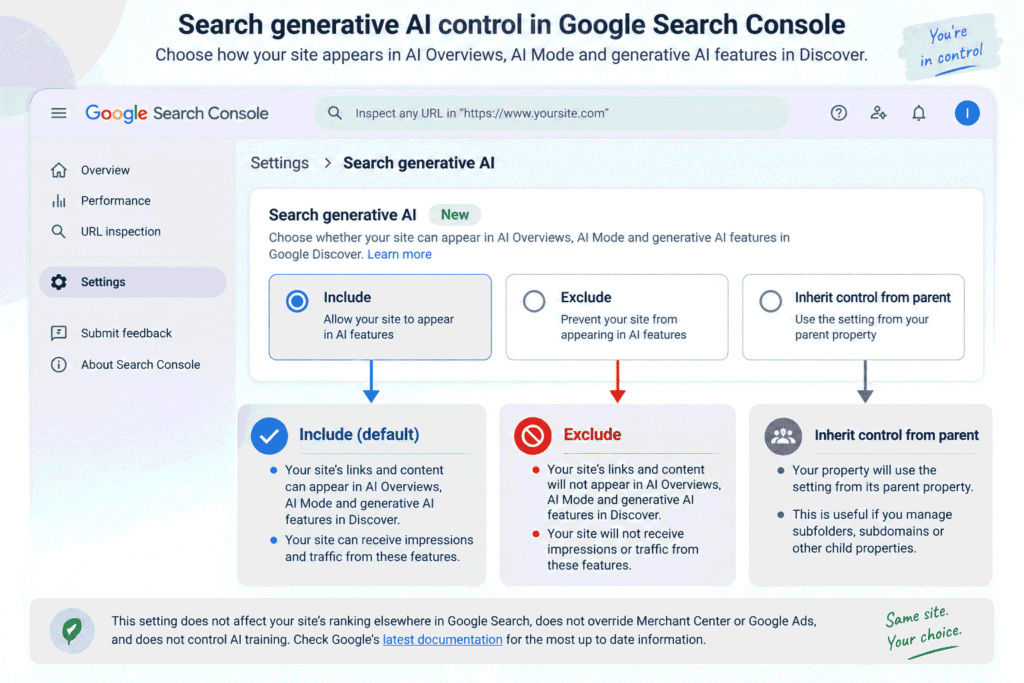
The Search generative AI control in Search Console is the dedicated site owner setting for deciding whether your site can appear in Google’s generative AI features in Search.
As of September 2026, the control covers AI Overviews, AI Mode and generative AI features in Google Discover. Google gives you 3 choices: Include, Exclude, and Inherit control from parent.
Include is the default for properties without a parent setting they inherit. Your site’s links and content can appear in the covered generative AI features, and the site can receive impressions and traffic from them.
Exclude prevents your site’s links and content from appearing in those generative AI features. Google says excluded sites will not receive traffic or impressions from those features.
Inherit control from parent means the property follows the setting of its parent property. This matters if you manage a subfolder, URL-prefix property, subdomain or another child property under a property with a configured control.
How to find it
Open Search Console, choose the relevant property, go to Settings, then open Search generative AI.
Before changing the setting, check which option is currently selected and whether the property is inheriting its value from a parent. A change generally takes a few days to take effect, and Google says content is excluded within 1 to 2 days after the control goes live, although some pages can take longer because of caching and propagation.
Google also states that this control is not used as a ranking or inclusion signal for other parts of Search, does not override participation in services such as Merchant Center or Google Ads, and does not affect AI training. Google-Extended is the separate control for training and certain grounding uses.
Because the setting has changed during 2026, check Google’s current Search generative AI control documentation immediately before you change it.
What opting out actually costs
Excluding your site means you will no longer receive impressions or traffic from the covered generative AI features.
The AI response itself does not disappear. Google says other sites can still appear in those features, including content that may be similar to yours. So you give up the opportunity to be linked or used as a source in those features while other eligible sites remain available.
The potential audience is large. In its 3 June 2026 announcement, Google said AI Overviews had more than 2.5 billion monthly active users and AI Mode had surpassed 1 billion monthly users. Those are Google’s figures, not an independent measurement. Google’s announcement about the new website owner controls provides the source for those figures.
Measure before you decide
The Generative AI performance report in Search Console shows your site’s impressions from AI Overviews and AI Mode, with breakdowns such as page, country, device and date.
Open Search Console and look for the Generative AI performance report in your Search performance reporting. Write down the total impressions for a useful recent period, then check which pages are receiving them. You can also break the report down by country and device if those differences matter to your business.
There is an important limitation: the report gives you impression data, not a separate click count for these generative AI features. Your impression number is therefore evidence of exposure, not a direct measure of the visits you would lose after opting out.
Use this Search Console guide for checking AI search traffic and impressions if you need help pulling the number before making the decision.
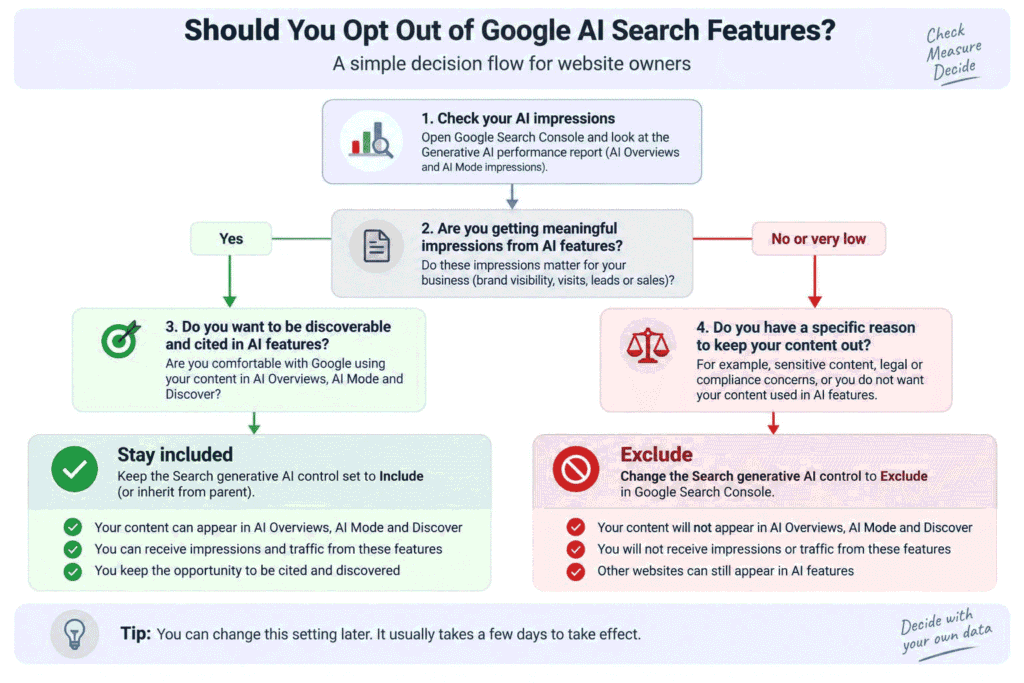
So should you opt out? A short test
Whether you should opt out depends on what your site is trying to get from Search and what your own Search Console data shows.
- What share of your impressions currently come from AI features? Start with the actual number instead of assuming AI features are taking away your traffic.
- Does your business depend on the visit itself, or on the brand being seen? A publisher selling subscriptions may care about visits differently from a brand that also values being cited and discovered.
- Would another site take the space you leave? Excluding your pages removes your own links and content from the covered features, while other sites remain eligible.
- Can you reverse the decision if you change your mind? The control can be changed again, but Google’s processing and propagation still take time.
For many small sites and freelancers, staying included and improving the pages that can be cited is a reasonable default because it preserves the opportunity to appear in these features while you learn what the new Search data says. If that is the route you take, this guide to appearing in AI Overviews gives you the practical next step.
Ask AI for the decision, properly
A useful AI decision starts with your site’s numbers, controls and business goal, not with a generic question about Google AI search.
Here is the prompt a beginner might naturally type:
Should I opt out of Google AI search?That question gives the AI almost nothing to work with. It does not know what your site sells, how important Google traffic is, how much exposure you already get in AI features, what controls are active, or what you actually want to protect.
Use this version instead:
I manage this website: [SITE URL]
What the site does or sells:
[DESCRIBE THE BUSINESS, PRODUCTS, SERVICES OR CONTENT]
Where our traffic currently comes from:
[FOR EXAMPLE: GOOGLE ORGANIC SEARCH 65%, DIRECT 15%, REFERRALS 10%, SOCIAL 10%]
Our current Generative AI performance report data in Google Search Console:
[INSERT AI OVERVIEWS IMPRESSIONS]
[INSERT AI MODE IMPRESSIONS]
[INSERT DATE RANGE]
[INSERT ANY PAGE OR COUNTRY BREAKDOWN THAT MATTERS]
Current controls already in place:
[PASTE ANY GOOGLE-EXTENDED ROBOTS.TXT RULES]
[PASTE ANY NOSNIPPET, DATA-NOSNIPPET, MAX-SNIPPET OR NOINDEX RULES]
[STATE WHETHER THE SEARCH GENERATIVE AI CONTROL IS INCLUDE, EXCLUDE OR INHERIT FROM PARENT]
What we count as a win:
[VISITS, LEADS, SIGN-UPS, SALES, BRAND VISIBILITY, OR ANOTHER GOAL]
Assess these 3 controls separately:
1. Google-Extended
2. Search snippet controls such as nosnippet, data-nosnippet, max-snippet and noindex
3. The Search generative AI control in Google Search Console
For each control, explain:
- What it would change for this site
- What it would not change
- The main trade-off
- Whether it matches our stated goal
Then give me one recommendation for this specific site and explain the reasoning using only the information I provided. Do not assume missing traffic, conversion, ranking or revenue data. If any part of the recommendation depends on a current Google feature or rule, tell me what I should verify in Google's current documentation.
The second prompt works better because it gives the AI the 3 pieces the decision depends on: the site’s situation, the actual exposure number and the business goal. It also asks the model to assess each control separately, which helps prevent the common mistake of treating Google-Extended, snippet controls and the Search Console setting as interchangeable.
Check anything the AI says about a specific control against Google’s current AI features documentation and the other Google documentation linked in this post before making a change. This area changed materially in 2026, and AI answers can be based on older information.
What to do this week
Start with the number, not the robots.txt file.
- Open the Generative AI performance report in Search Console and write down your recent AI Overview and AI Mode impressions.
- Check your robots.txt file for a Google-Extended rule you did not knowingly add, and check your pages for snippet or noindex controls that may already be affecting Search.
- Leave the Search generative AI control alone until you have that first number and have checked what the current Google documentation says about the setting.
Frequently Asked Questions
what is google-extended
Google-Extended is a robots.txt product token that lets website publishers control whether Google-crawled content may be used for future Gemini model training and certain grounding uses. It does not control a site’s inclusion in Google Search or act as a Search ranking signal.
what is data-nosnippet
data-nosnippet is an HTML attribute that tells Google not to use the marked text in Search result snippets. It can therefore affect what content from a page is shown in Search, including content used by Search features.
how to opt out of ai overview google
For a website owner, use the Search generative AI control in Search Console and choose Exclude if you want the site excluded from AI Overviews and the other covered generative AI features. This control is separate from Google-Extended and from page-level snippet controls.
can you disable google ai overview
Yes, but the method depends on what you mean: a searcher can change what they personally see, while a site owner can use Search Console to exclude their site’s content from Google’s covered generative AI features.

Leave a Reply