
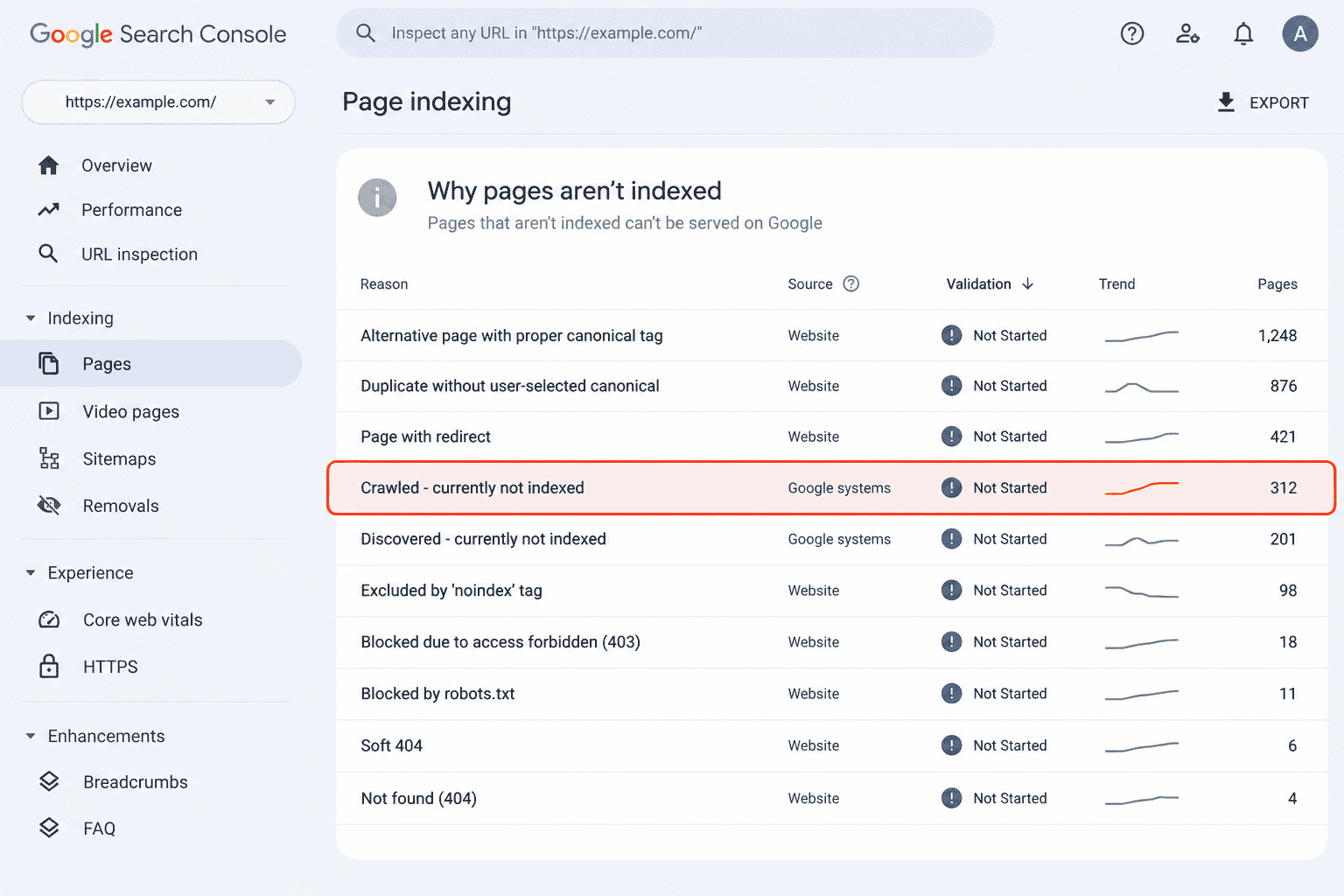

It’s Friday evening. You open Search Console to check a post you published last month. Then you see 312 next to “Crawled – currently not indexed”. Your post is in the list. You search the phrase, find advice about crawl budgets and log files, and close the laptop wondering what broke.
Most of those 312 URLs may be there for perfectly ordinary reasons. The useful question is not how to make the number disappear. It is which of those pages you actually wanted Google to index.
What the “Crawled – currently not indexed” status actually means
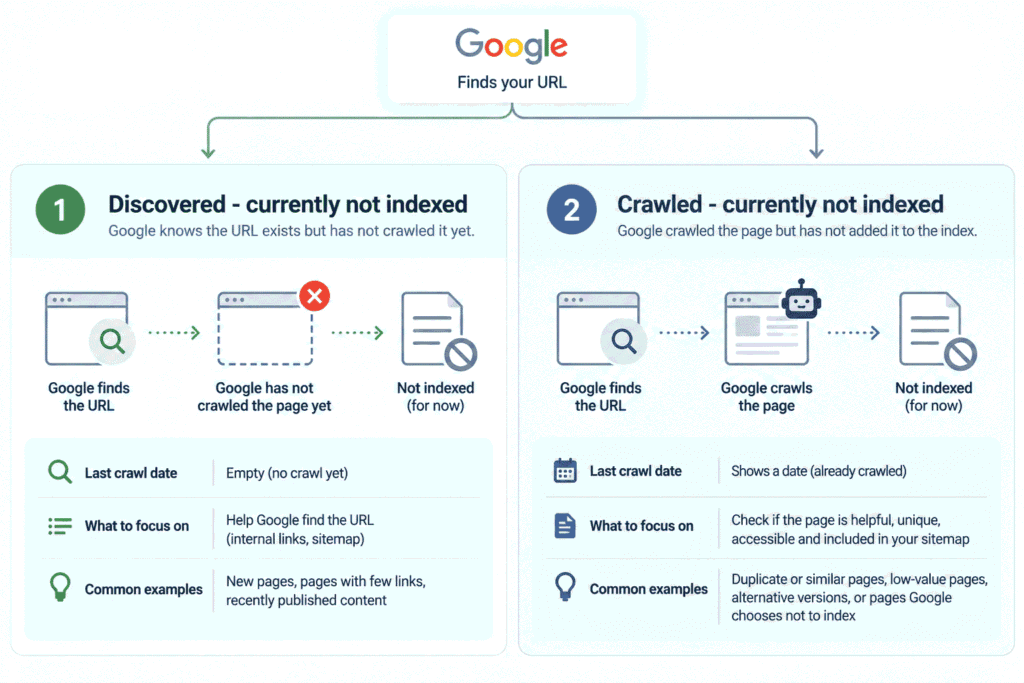
“Crawled – currently not indexed” means Google crawled the page but has not added it to the Google index. Google says the page may or may not be indexed later, and there is no need to resubmit that URL just because it has this status.
As of October 2026, Search Console uses the Page indexing report for this information. Older tutorials may call it the Index Coverage report.
The key point is what this status rules out. Google has already reached and crawled the page. It is therefore different from “URL blocked by robots.txt”, “URL marked ‘noindex'”, or “Blocked due to access forbidden (403)”. Those are separate reasons in the Page indexing report.
Google also says you should not expect every URL on a site to be indexed. Focus on the important, canonical pages you actually want in Search. For the wider context on indexing and AI search, see how indexing fits into appearing in AI Overviews.
For the official status definitions, see Google’s Page indexing report documentation.
Is your number actually a problem?
Your number is worth investigating only when the URLs in it include pages you genuinely wanted to publish and have indexed.
Google’s guidance says that if your site has fewer than 500 pages, you probably do not need to rely on the Page indexing report. Instead, use searches such as these:
site:example.com
site:example.com/your-important-page/
Replace the examples with your domain and an important URL. If the page appears, Google has indexed it. If it does not, inspect that specific URL instead of assuming the total count explains the problem.
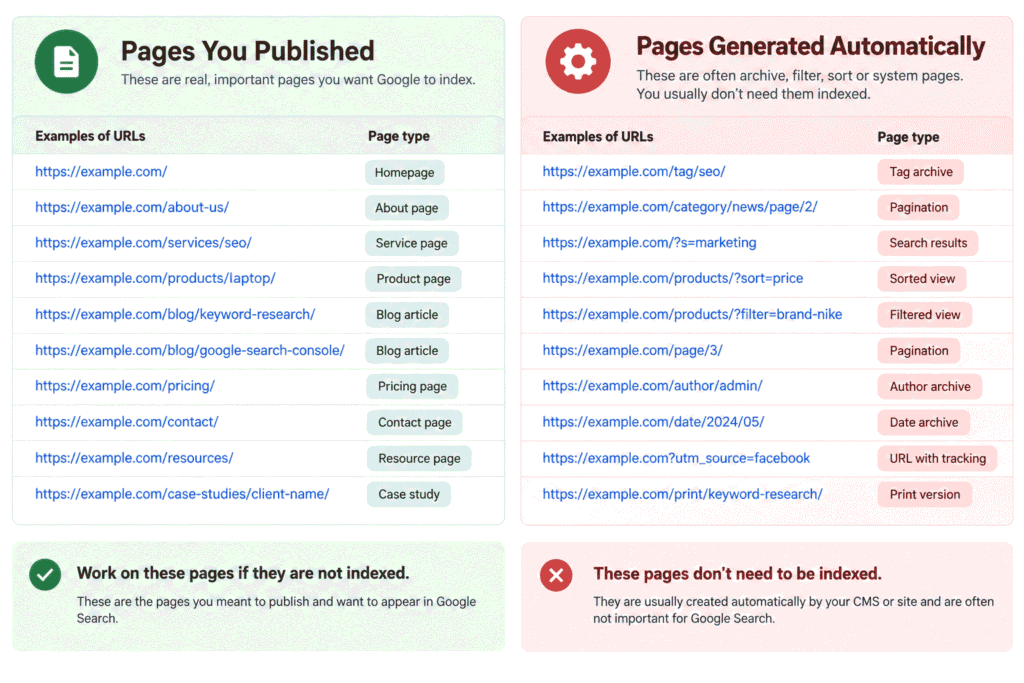
Next, look through the URLs in the report and split them into 2 groups:
- Pages you meant to publish: articles, service pages, category pages, product pages, or other important URLs.
- Pages you never meant to make important: tag archives, filtered views, sorted URLs, pagination, or other generated variations.
If most of your 312 URLs belong to the second group, the number is not proof that 312 important pages are failing. Google says non-indexed URLs can be fine when there is a valid reason.
For another Search Console workflow, you can see how to check if AI search sends you traffic.
The 4 things worth checking, in order
For pages you genuinely want indexed, check these 4 things before doing anything more technical.
1. Is the page genuinely different from your other pages?
Check whether the page has a clear purpose and is meaningfully different from other URLs on your site.
Look at the page and a few related URLs. If several pages use almost the same wording or exist because of a small template variation, pause before creating more versions. Google does not expect duplicate or alternate URLs to be indexed.
2. Can a reader reach it from somewhere on your site?
A page you want indexed should be reachable through normal links on your site or through your sitemap.
Open the page and ask whether a visitor could reach it from a relevant article, category page, navigation item, or another sensible internal link. Google says a page needs a way to be found, including through links or a sitemap.
3. Is it in your sitemap?
Check whether the URL you care about is included in the sitemap you submit to Google.
This is useful for important pages that are not easy to reach through navigation. Search Console can show sitemap information during URL inspection. If the page belongs in your sitemap and is missing, fix that first.
4. Did you or a plugin set it to noindex without meaning to?
Check the page’s current indexing setting for an accidental noindex directive, especially if your CMS or SEO plugin controls this setting.
This check matters because the report can reflect an earlier crawl. Inspect the URL and, if you changed the page since Google last crawled it, use Test live URL to check the current version. Google says the live test can show whether the current page allows indexing, although it cannot predict every indexing decision.
If you find an accidental noindex, remove it and let Google recrawl the page. If all 4 checks are fine, waiting is a legitimate answer. Google automatically recrawls pages, and its documentation says there is no need to request another crawl unless an important change was made and Google has not noticed it for a while.
If you see “Discovered – currently not indexed” instead, it is a different problem
“Discovered – currently not indexed” means Google knows the URL exists but has not crawled it yet.
The easiest difference to spot is the crawl information. Google says the last crawl date is empty for a discovered URL because the page has not been fetched. A crawled URL has already been visited.
If Google has not fetched the page, focus first on how it can find the URL, such as internal links and your sitemap. Judging the page content can wait because Google has not read it yet.
Google also says its crawlers adjust automatically when a site slows down or returns errors, to avoid overloading the server. For a small site, you usually do not need to investigate this at a technical level.
What about blocking AI crawlers?
Blocking an AI-related Google control and blocking Google Search are separate decisions.
Google’s current documentation says Google-Extended is a product token that publishers can use to control certain uses of crawled content for future Gemini models. It does not affect a site’s inclusion in Google Search or act as a Search ranking signal, and it does not have its own separate HTTP user agent string.
So do not connect a “Crawled – currently not indexed” count to an AI crawler setting automatically. First identify what your setting actually blocks.
A blanket bot-blocking rule at the host, firewall, or CDN level is different. If it blocks Googlebot itself, Google cannot crawl affected pages. That is an access problem and would show up under a different status or crawl result.
If you are deciding what to do about Google’s AI search features, keep that decision separate from this indexing diagnosis and read the AI search opt-out guide.
For the current definition of Google-Extended, see Google’s documentation on its common crawlers. For Google’s explanation of how crawling responds to site conditions, see Google’s documentation on how crawling works.
Try it on your own report
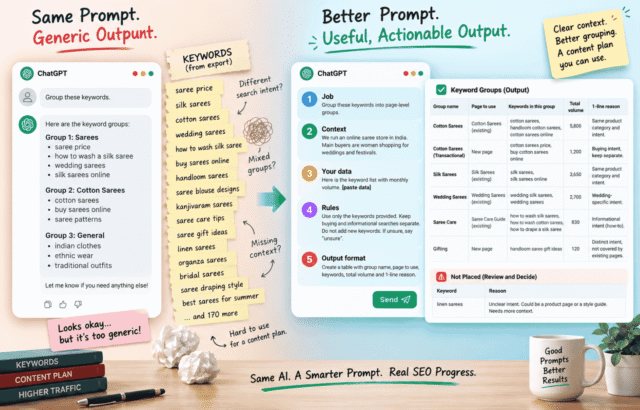
The useful AI task here is sorting your URL list, not asking AI to decide which pages deserve to be indexed.
Here is the prompt most people naturally write:
Why are my pages crawled but not indexed?That asks for a general explanation, so you will get a familiar list of possible causes. It does not give the AI your actual URLs to sort.
Now give it the list and the context around it:
I am reviewing the "Crawled - currently not indexed" URLs from Google Search Console.
My site:
[Describe the site and who it is for in 1 line]
Here are up to 50 URLs from my Page indexing report:
[Paste the URLs here]
These URL patterns are deliberate and should be treated as automatically generated:
[Example: /tag/, /page/2/, filtered views, sorted views]
Task:
1. Split the URLs into 2 groups:
 A. Pages that look like real published content
 B. Pages that look like automatically generated archive, filter, sort, or pagination URLs
2. For Group A only, identify URLs that look like near-duplicates based only on the URL and slug wording.
3. Do not judge whether any page deserves to be indexed. You are only sorting URL patterns and identifying possible near-duplicate pairs.
Output:
1. Group A as a list
2. Group B as a list
3. A short table of suspected duplicate pairs, maximum 10 rows
The second prompt works better because it gives the AI the URL list and clear sorting rules. It cannot see the actual pages from the list alone, so it cannot assess their content quality or decide whether Google should index them.
Frequently Asked Questions
How to fix crawled but not indexed?
Fix only the pages you actually want indexed, starting with whether they are distinct, reachable through your site, included in your sitemap, and free of an accidental noindex setting.
What does “not indexed” mean?
“Not indexed” means Google has not added that URL to its search index, but it does not automatically mean there is an error.
What does crawling and indexing mean?
Crawling is when Google fetches and reads a page, while indexing is the later process of processing that page and adding it to Google’s index.
How to solve an indexing problem?
Start with the specific status shown for the URL, then fix the issue that matches that status instead of applying a generic checklist.
Do this with your report today
Open the “Crawled – currently not indexed” list and take the first 50 URLs. Mark each as either a page you meant to publish or a URL generated by an archive, filter, sort, or pagination system. Work only on the first group, and run the 4 checks before touching anything more technical.


Leave a Reply