
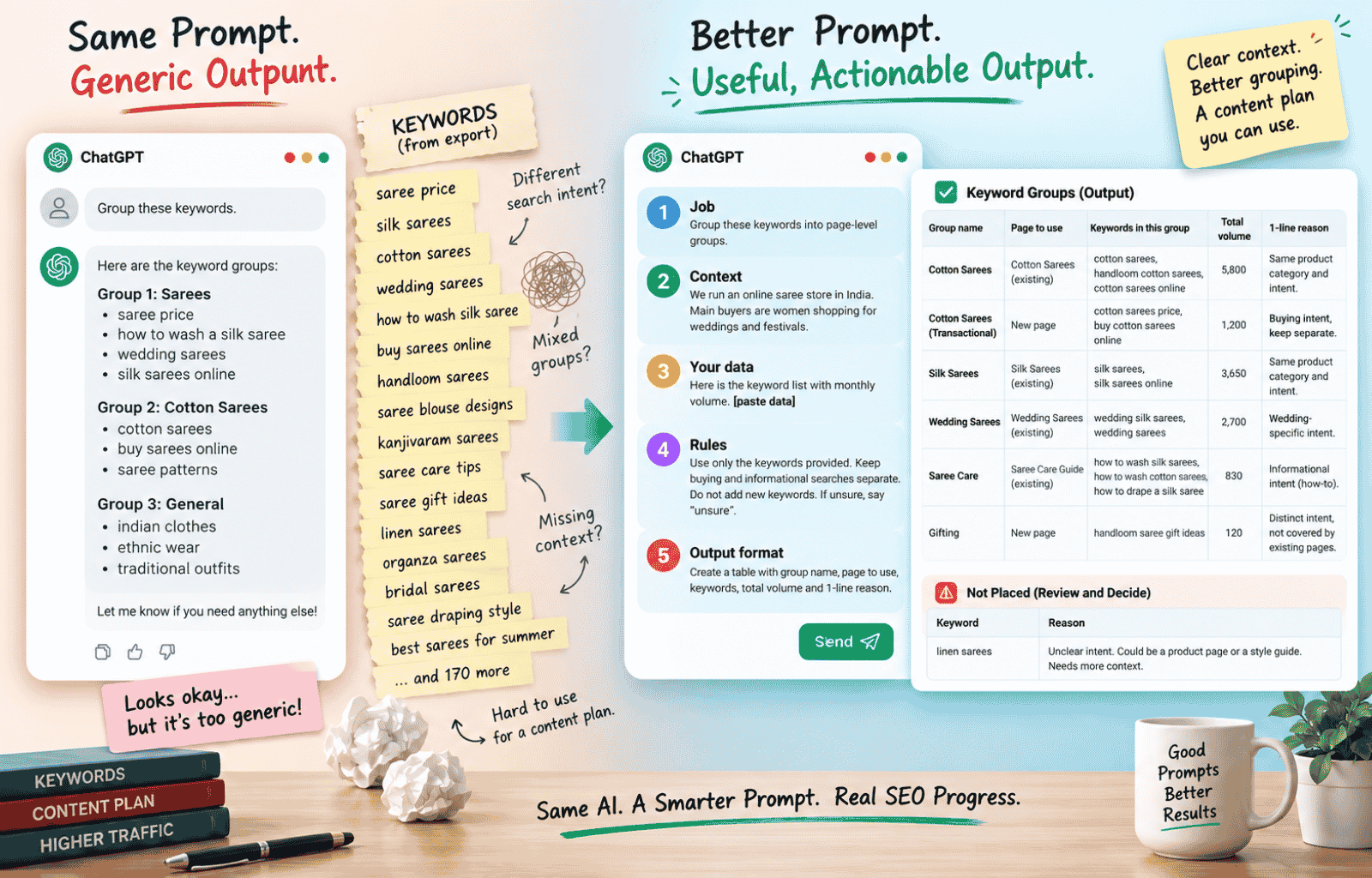

Friday evening. A client’s keyword export sits in a spreadsheet, 180 rows long, and the content plan is due Monday. You copy the whole column into ChatGPT with one line on top: “group these keywords.” It sends back 8 neat groups with confident names. Then you spot “saree price” and “how to wash a silk saree” sitting in the same group. And 2 keywords you never exported. You close the tab and start sorting by hand.
ChatGPT was not the weak link. It knew nothing about the site, the buyer, or what “group” was supposed to mean, so it guessed. Almost everyone starts this way. The useful change is to tell ChatGPT what the job is, what information it can use, what rules to follow, and what the final answer should look like.
The keyword list that came back wrong
ChatGPT for SEO becomes useful when you give it enough information to make the SEO decision you actually need.
A 1-line request such as “group these keywords” leaves too much open. Group them by similar words? By search intent? By product? By the page that should rank? Should buying searches stay separate from informational searches? Should an existing page be used where one already exists?
ChatGPT has to make those decisions somehow. If you don’t provide the rules, it will fill the gaps itself. That can produce an answer that looks organised while still being unusable for your content plan.
Which “ChatGPT for SEO” this guide is about
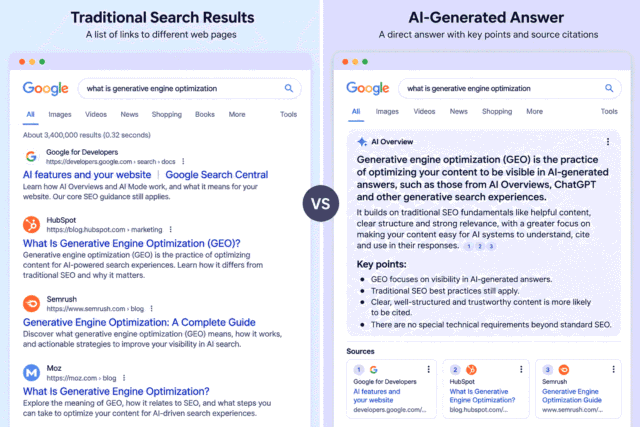
ChatGPT for SEO can mean 2 things: using ChatGPT to do SEO tasks faster, or getting your pages shown inside ChatGPT’s answers. This guide is about the first.
If you are interested in the second meaning, read LLM SEO and what actually changes in your day-to-day workflow. A separate guide on Generative Engine Optimization is planned for AiTutorials.in.
Current as of September 2026: ChatGPT features and settings can change, so check the linked OpenAI help pages before publishing or relying on a feature-specific detail.
Why ChatGPT gives generic SEO answers
ChatGPT gives generic SEO output when it is given a task with no context, because it can only work with what is available to it in the conversation and through any enabled tools.
It does not automatically know your website structure, your Search Console data, your keyword export, or which pages you already have. If those details matter to the task, give them to ChatGPT instead of expecting it to know them.
OpenAI’s guidance on writing effective ChatGPT prompts recommends being clear and specific and providing enough context for the model to understand the request. It also recommends reviewing the first response and refining the request rather than expecting the first version to be perfect.
There is another problem that matters in SEO: ChatGPT can be confidently wrong. OpenAI says ChatGPT can produce incorrect or misleading information, including fabricated references, and that confidence is not the same as reliability. Its guidance recommends verifying important information rather than treating the response as a final source.
For SEO, that means you should not ask ChatGPT to remember search volume or keyword difficulty and then put those numbers into your plan. Get the numbers from the SEO tool you already use, paste the relevant data into the conversation, and tell ChatGPT not to change them.
The 5 things every SEO prompt needs
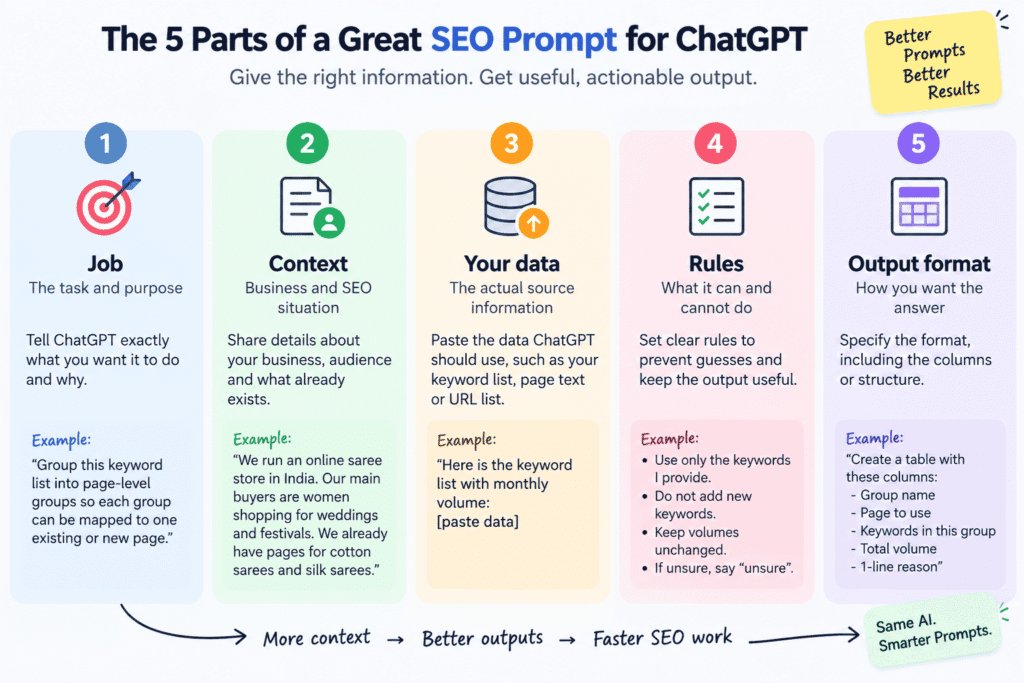
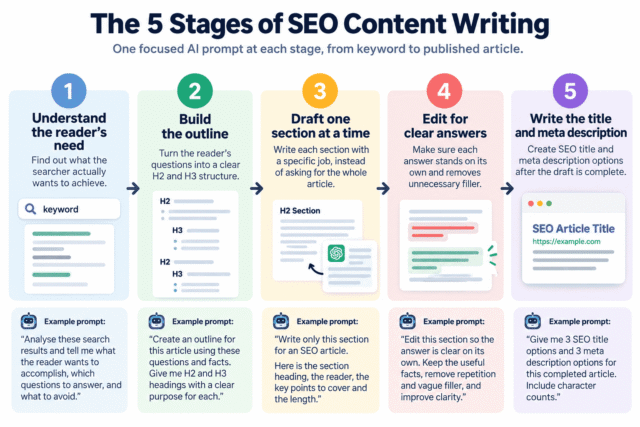
A good SEO prompt for ChatGPT has 5 parts: the job, the context, your real data, the rules, and the output format.
The job tells ChatGPT exactly what you want it to do and why. For example: “Group this keyword export into page-level groups so each group can be mapped to one existing or new page.”
The context explains the business and the SEO situation around the task. Tell it what the site sells, who the customer is, and which relevant pages already exist.
Your real data is the information ChatGPT should actually use. Paste the keyword export, page text, URL list, or other source material into the conversation. Don’t write “go find my keywords” when the decision depends on your private SEO data.
The rules prevent ChatGPT from filling gaps with guesses. For example, tell it to use only the keywords you provide, keep the original volumes unchanged, and write “unsure” when the available information is not enough.
The output format tells it how you want the answer delivered. A table with named columns is usually easier to check and move into a spreadsheet than a long block of prose.
| Part | What to include | SEO example |
|---|---|---|
| Job | The task and purpose | Group keywords into page-level groups |
| Context | Business, audience, existing pages | Handloom saree store, wedding buyers |
| Your data | The actual source data | Keyword and monthly volume columns |
| Rules | What ChatGPT can and cannot do | Do not add keywords or change volumes |
| Output | Required structure | Table with group, page, keywords and volume |
OpenAI also recommends reviewing the response and refining the prompt after seeing what the first answer does. In SEO work, that makes the first response a working draft rather than something you have to accept as final.
How to use ChatGPT for SEO keyword grouping: a worked example
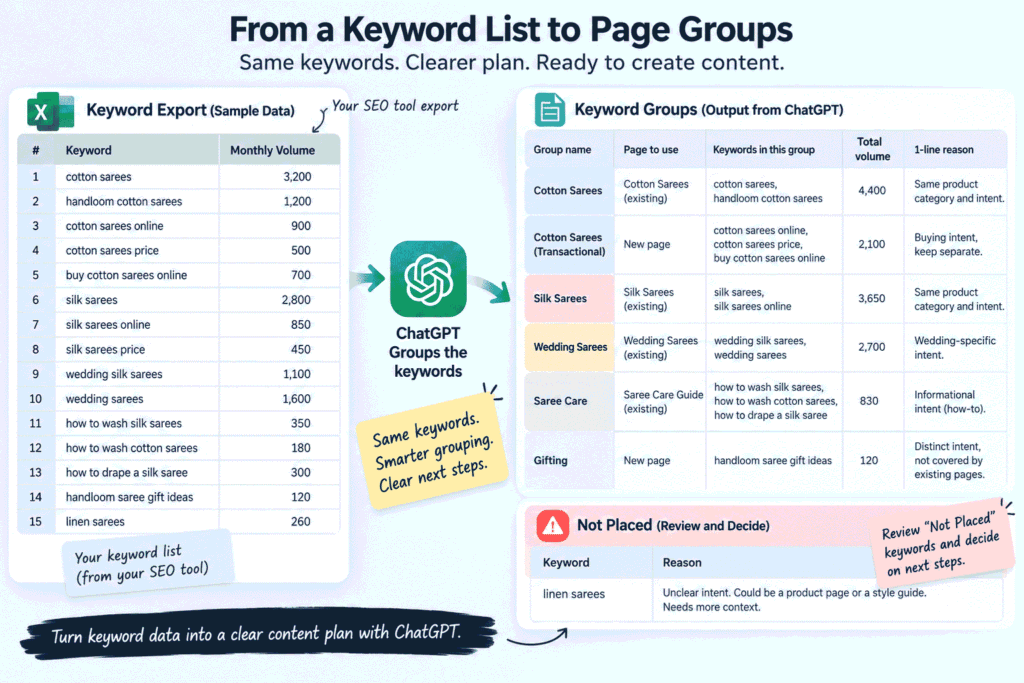
The fastest way to use ChatGPT for SEO keyword grouping is to give it your real keyword data, define what one page should satisfy, and tell it exactly how to handle anything that does not fit.
The prompt most people write
The vague version is usually only a line or two:
Group these keywords:
[pasted list]
This gives ChatGPT a list and a verb, but not the SEO decision behind the verb. It may group keywords because they contain similar words, even when the people searching them want different things. It may also make assumptions about which pages exist or add a keyword that was never in your export.
The version that actually works
Here is a complete example using a fictional Indian store selling handloom cotton and silk sarees. The keyword volumes below are sample data for demonstrating the prompt. They are not real search volumes.
You are helping an SEO executive plan pages for a small online saree store. The goal is to create 1 page for each distinct search need, or map a keyword group to an existing page when that page already satisfies the search need.
Business context:
The store sells handloom cotton sarees and silk sarees online in India. Its main buyers are women shopping for weddings, festivals and traditional occasions, with budgets ranging from ₹1,500 to ₹15,000.
Existing pages:
1. Cotton Sarees
2. Silk Sarees
3. Wedding Sarees
4. Saree Care Guide
Keyword data:
The monthly volumes below are sample data from my own SEO tool. Do not change, estimate or replace these numbers.
Keyword | Monthly volume
cotton sarees | 3200
handloom cotton sarees | 1200
cotton sarees online | 900
cotton sarees price | 500
buy cotton sarees online | 700
silk sarees | 2800
silk sarees online | 850
silk sarees price | 450
wedding silk sarees | 1100
wedding sarees | 1600
how to wash silk sarees | 350
how to wash cotton sarees | 180
how to drape a silk saree | 300
handloom saree gift ideas | 120
Grouping rules:
Group keywords when the same page would genuinely satisfy the person searching.
Keep buying searches such as price and buy online separate from how-to searches such as how to wash and how to drape.
Use the existing pages when they satisfy the search need. Recommend a new page only when an existing page does not fit.
Use only keywords from the list. Do not add new keywords.
Do not change, estimate or invent any monthly volume.
If a keyword does not clearly fit a group, put it in a "not placed" list.
Write "unsure" instead of guessing.
Output:
Create a table with these columns:
Group name
Page to use
Keywords in this group
Total volume
1-line reason
For Page to use, write the existing page name or "new page".
Calculate Total volume by adding only the numbers provided above.
After the table, provide:
Not placed:
- Keyword
- Reason
The difference is not the length of the prompt by itself. The second version defines what the business sells, who is searching, which pages already exist, what “group” means, which data is authoritative, what ChatGPT must not do, and how the result should be presented.
That changes the job from “find things that look similar” to “decide which keywords can be satisfied by the same page”. The model now has information that was missing from the 1-line request.
Check the groups before you build pages
Check every keyword, every page assignment and every volume before you turn the groups into a content plan.
First, make sure every keyword in the output came from your export. The “not placed” list is useful here because the keywords in the groups plus the keywords in that list should account for the original set.
Next, read each group as a searcher would. If someone searching “how to wash silk sarees” would expect instructions while someone searching “silk sarees price” wants to compare products, those searches should not be pushed onto the same page just because both contain the words “silk sarees”.
Finally, check the volume totals against your own sheet. ChatGPT can make arithmetic mistakes even when it has the correct numbers in front of it.
Honestly, this check is the part most people skip. Take the extra few minutes before using the groups to create pages. When the groups are ready, you can move to the writing stage with the Claude SEO Writing Playbook.
2 more everyday SEO tasks, fixed the same way
The same 5-part structure works for other SEO tasks where ChatGPT needs information from your website or your own data.
Internal link suggestions
ChatGPT can suggest internal links when you give it the actual post text and the URL list it is allowed to use.
A vague request would be:
Suggest internal links for this blog post.A more useful version is:
You are helping an SEO executive add internal links to a new blog post.
New post:
[paste the full post text]
Published pages:
[paste the exact URL and title for each published page]
Task:
Suggest 3 to 5 internal links from the published page list.
Rules:
- Use only URLs from the published pages list.
- Do not invent or guess URLs.
- For each suggestion, quote the exact phrase already present in the new post that should become the link.
- Do not rewrite the sentence just to create a link.
- If fewer than 3 relevant links exist, say so.
Output:
Anchor phrase | Destination URL | Page title | Reason
The important detail is the URL list. ChatGPT cannot know which pages you have published simply because they would be sensible pages for your site. Without the list, it may produce plausible URLs that do not exist.
Image alt text in batches
ChatGPT can draft alt text in batches when you tell it what each image actually shows instead of asking it to guess.
You are helping an SEO executive write accurate image alt text.
Page topic:
[paste the page topic]
Target keyword:
[paste the target keyword]
Images:
1. [plain description of exactly what image 1 shows]
2. [plain description of exactly what image 2 shows]
3. [plain description of exactly what image 3 shows]
Task:
Write 1 plain-sentence alt text for each image.
Rules:
- Describe only what the image actually shows.
- Use the target keyword only when it genuinely describes the image.
- Do not add facts that are not in the image description.
- Do not stuff keywords.
- Keep each sentence useful to someone who cannot see the image.
Output:
1. [alt text]
2. [alt text]
3. [alt text]
Google’s guidance on generative AI says website content should meet standards for accuracy, quality and relevance, and specifically includes image alternate text among the page elements that need that care. It also warns that generating many pages without adding value for users may violate its scaled content abuse policy. Google’s guidance on generative AI content explains both points.
What not to hand over to ChatGPT
ChatGPT is a useful assistant for SEO work and a poor substitute for your SEO data.
Do not ask it to supply search volumes or keyword difficulty from memory and treat those numbers as your research. Use the numbers from your own SEO data and give ChatGPT those numbers when the task needs them.
Do not publish its output without checking it. OpenAI’s guidance explains that ChatGPT can produce incorrect or misleading information, including fabricated references, so important facts and data still need verification. OpenAI’s guidance on checking ChatGPT’s answers covers these limitations.
Also be careful about asking it to produce large numbers of pages with little original value. Google says that using generative AI to create many pages without adding value for users may violate its scaled content abuse policy. The useful role for ChatGPT is helping with work where you can supply the source material and review the result, not removing the human check from the publishing process.
Frequently Asked Questions
Is ChatGPT good for SEO?
Yes, ChatGPT can be useful for structuring and drafting SEO work when you give it the right data, but it should not be treated as your source of SEO data. Check important facts, figures and references before using its output.
Can chatgpt do seo?
ChatGPT can handle parts of an SEO job, but it cannot independently manage your SEO work because it does not automatically have your rankings, Search Console data or complete site information. A person still needs to provide the relevant data, decide what to do and check the result; for traffic data, you can see what data is available in Search Console.
Does chatgpt generated text hurt your seo?
Google’s guidance does not say that using generative AI itself is the problem; its concern includes content created at scale without adding value for users. The focus should remain on accuracy, quality and relevance rather than on whether a particular tool was used to help create the content.
Save your SEO prompt so you stop retyping it
The easiest next step is to turn the 5-part structure into a reusable starting point for your regular SEO work.
Export your next keyword list from the SEO tool you already use. Run the improved grouping prompt with your real business details, existing pages and keyword data. Then save the reusable context, such as what the site sells, who the reader is and the rules you want ChatGPT to follow.
As of September 2026, ChatGPT’s Custom Instructions let you share information you want ChatGPT to consider in its responses, and OpenAI says the feature is available across its plans and supported platforms. Check OpenAI’s current Custom Instructions guidance before using it, because settings and product details can change.
If you also work with Claude, the Claude Skills guide shows how reusable instructions can be applied to SEO and marketing workflows.

Leave a Reply