
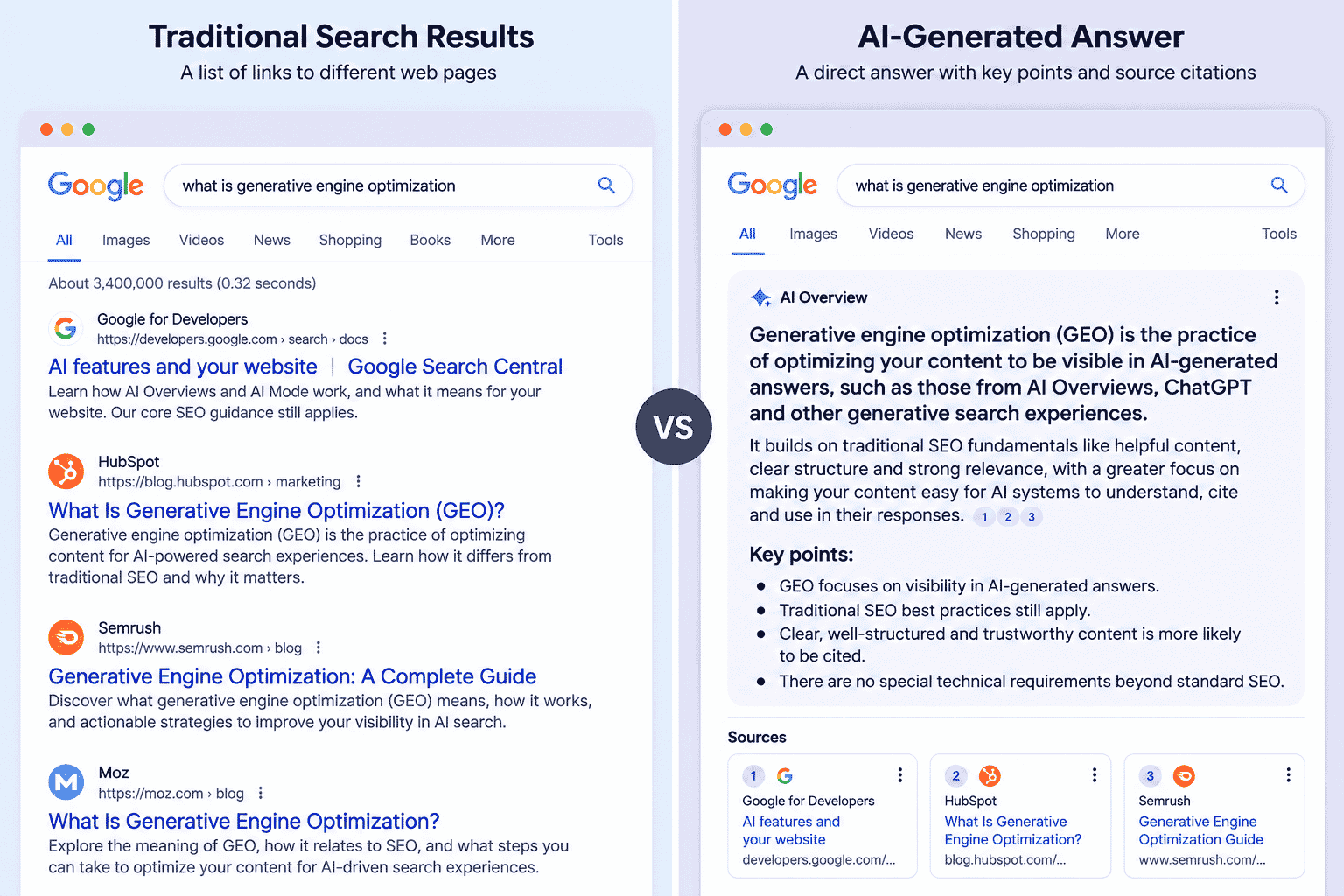

A vendor email lands in your inbox offering GEO services. Your manager forwards it with 3 words: “Do we need this?” You open ChatGPT and type: “is GEO different from SEO?” The answer says yes, GEO is a new discipline, but it also builds on SEO fundamentals. Both sound reasonable. Neither tells you what to change on your site or what to reply to your manager.
The problem was not ChatGPT. The question gave it nothing about your site, your pages, or the decision you were trying to make. So what is generative engine optimization, and do you actually need to change anything?
What generative engine optimization actually means
Generative engine optimization is the practice of improving how your content can appear or be used in answers produced by generative search systems.
The term has a specific origin. A research paper titled GEO: Generative Engine Optimization introduced the term as a framework for improving the visibility of web content in generative engine responses. The paper by Pranjal Aggarwal and co-authors was published in the Proceedings of the 30th ACM SIGKDD Conference in 2024, although its arXiv version was first posted in 2023. Read the original GEO research paper.
That context matters because GEO did not start as a Google product name. The research focused on search systems that retrieve information and then generate an answer from multiple sources.
For a marketer, the practical distinction is simple. AI SEO is the broader idea of adapting SEO work for search experiences that use AI. GEO is a more specific term for work aimed at visibility inside generative answers.
The terms overlap, and different companies use them differently. So treat GEO as a label for a type of SEO work, not as proof that you need a separate department, process, or service.
What does GEO stand for in SEO?
GEO stands for Generative Engine Optimization when the discussion is about visibility in AI-generated search answers.
There is a catch: GEO has also been used for geographic or location-focused optimization. That is why “geo meaning in SEO” can be confusing. If someone is talking about locations, maps, local targeting, or geographic markets, they may mean the older usage. This post uses GEO to mean Generative Engine Optimization.
You may also see AEO, which commonly stands for Answer Engine Optimization. Google describes AEO and GEO as terms used to describe work focused on improving visibility in AI search experiences, while saying that, from Google’s perspective, optimizing for generative AI search is still SEO. See Google’s guide to optimizing for generative AI features.
What Google actually says about GEO
Google’s published guidance says the existing best practices for SEO remain relevant to AI features in Google Search, and that there are no additional requirements or special optimizations needed to appear in AI Overviews or AI Mode.
As of September 2026, Google’s documentation says that AI Overviews and AI Mode use the same foundational SEO practices that apply to Google Search overall. A page still needs to be indexed and eligible to appear in Search, and Google recommends basics such as crawlability, useful internal links, good page experience, and important content being available in text.
Google also addresses several tactics that are often presented as GEO requirements. Its current guidance says you do not need special AI files or markup, including llms.txt, you do not need to split content into tiny pieces for AI, and you do not need to rewrite content into a special format purely for AI systems. It also warns against chasing inauthentic mentions.
Google’s separate documentation on AI features makes the same point: “There are no additional requirements to appear in AI Overviews or AI Mode, nor other special optimizations necessary.” Read Google’s documentation on AI features and your website.
That does not mean there is nothing to improve. It means the useful work is closer to good SEO than the vendor pitch may make it sound. The question is how you make a page useful when a system may use parts of it to help construct an answer.
The 3 things that genuinely change
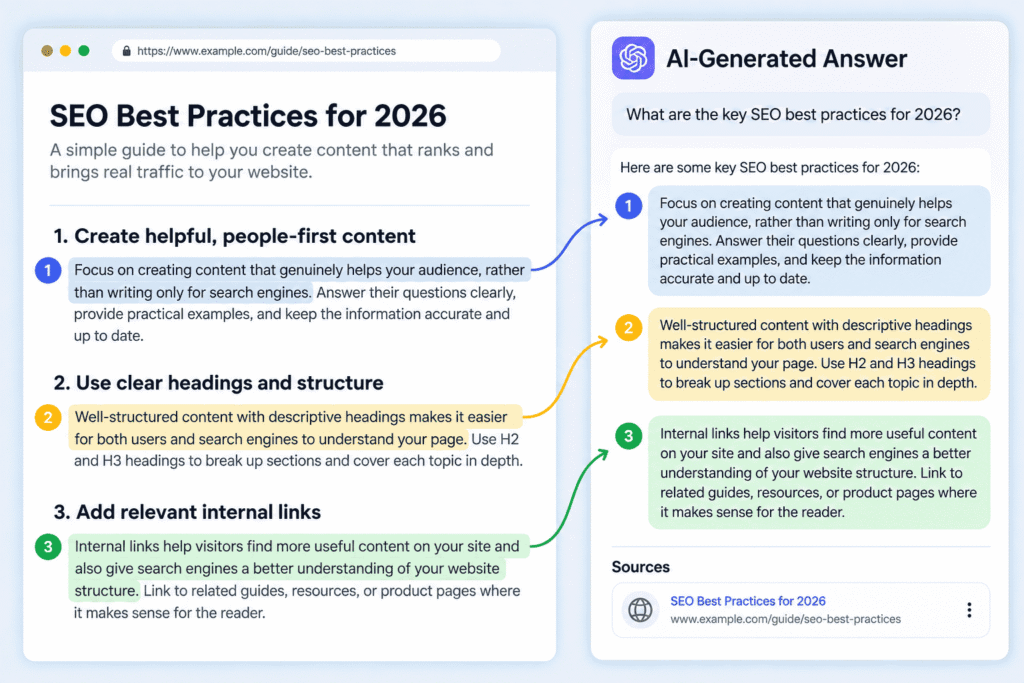
The main change is that you should think about how individual passages work inside an answer, not only how the whole page works as a search result.
1. Answers can use individual passages from your page
A passage may be useful to an AI answer even when the reader never sees the full page first.
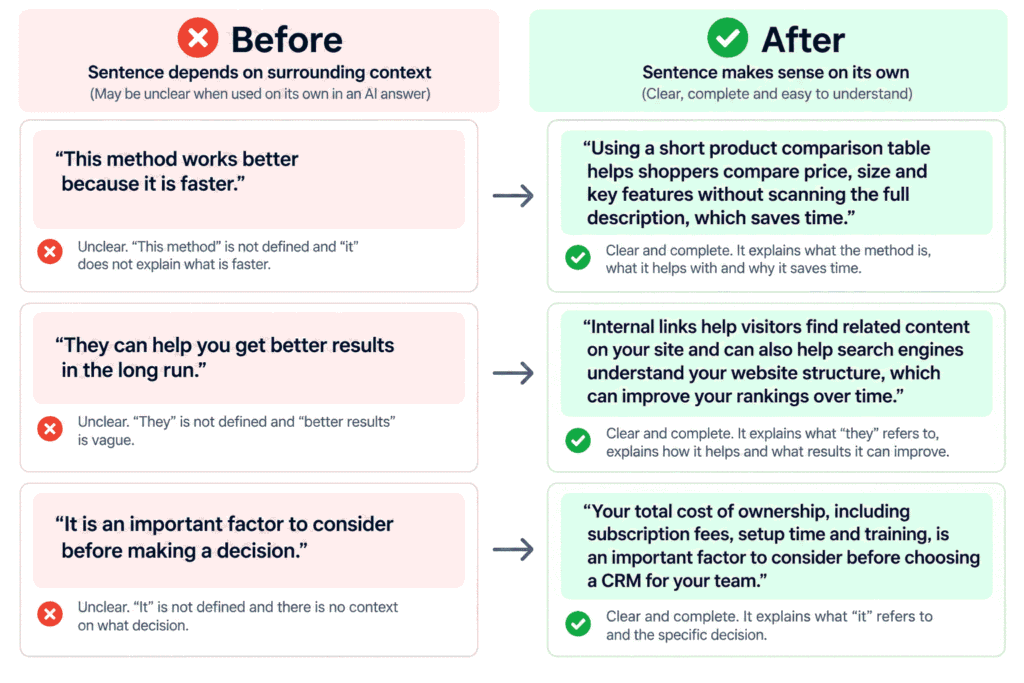
That makes context inside the sentence more important. Suppose your page says, “This method works better because it is faster.” If that sentence is lifted without the paragraph before it, “this method” and “it” have no clear meaning.
A stronger version names the subject: “Using a short product comparison table helps shoppers compare price, size, and key features without scanning the full product description.” The sentence carries its meaning on its own.
This is also why clear explanations matter. If you want a deeper look at how content can be prepared for AI search experiences, see how to rank in AI Overviews.
2. Being useful as a source matters alongside getting the click
A generative answer can use your information as a source without making the user open your page first.
That creates a different visibility question. Traditional SEO often makes you think, “How do I get this page into the search results?” With generative search, you also have to think, “If this page is used to support an answer, is there a clear, useful passage worth using?”
This does not replace the normal job of earning search visibility. It adds another way to think about the value of a page. Your page still needs to be relevant, crawlable, useful, and trustworthy.
3. Natural questions deserve complete answers
Generative search experiences are designed to handle longer, more conversational questions, so your page should answer real questions clearly rather than forcing awkward keyword phrases.
For example, a heading such as “Best CRM for small sales teams” can be useful, but a section answering “What should a 10-person sales team check before choosing a CRM?” may better reflect the question a reader actually has.
You do not need to create a separate page for every possible wording. Google’s current guidance says its systems can understand synonyms and general meanings, so focus on answering the user’s need rather than collecting every variation of a query.
What does not change
The fundamentals do not change: helpful content, a crawlable site, clear relevance, sensible internal linking, and a page that works for people still matter.
Google says there are no special technical requirements for AI Overviews or AI Mode beyond the requirements for being eligible in Search. If you want the wider day-to-day workflow rather than the narrower GEO question, read LLM SEO and what changes in your day-to-day workflow.
Try it on one page today
Try it on one page today by asking AI to find sentences that depend too much on surrounding context.
The vague prompt most people write is:
How do I optimize my page for GEO?That question is easy to answer badly because there is no page to inspect. The model can only give general advice.
Use this version instead:
I want to check whether an existing web page is easy for an AI-generated answer to quote or use.
Page text:
[PASTE THE FULL TEXT OF THE PAGE HERE]
Who this page is for:
[DESCRIBE THE TARGET READER IN 1 LINE]
The 3 questions a reader would type before landing on this page:
1. [QUESTION 1]
2. [QUESTION 2]
3. [QUESTION 3]
Task:
Find up to 5 sentences in the page that stop making sense when read on their own, outside the surrounding paragraph.
For each sentence:
1. Copy the original sentence exactly.
2. Rewrite it so it answers the underlying question completely by itself.
3. Keep the original meaning.
4. Do not add new facts, claims, examples, or information that is not already supported by the page.
Output:
Create a 2-column table with:
Column 1: Original sentence
Column 2: Rewritten sentence
Maximum 5 rows. If fewer than 5 sentences have this problem, return only the sentences that need a rewrite.
The second prompt works better because it gives the AI the actual page, the audience, the questions, and one specific editing job. Instead of returning advice that could apply to any website, it has material to inspect and a clear boundary around what it can change.
Frequently Asked Questions
Will GEO replace SEO?
GEO is not presented by Google as a replacement for SEO. Google’s current guidance describes AEO and GEO as terms for work focused on AI search visibility and says that, from Google’s perspective, optimizing for generative AI search is still SEO.
What’s the difference between SEO and GEO?
SEO covers the broader work of making web content discoverable, relevant, useful, and eligible to appear in search. GEO is a narrower term for improving the visibility or use of that content inside generative search answers.
Are AEO and GEO the same?
AEO and GEO overlap, but they are not always used to mean exactly the same thing. AEO commonly refers to Answer Engine Optimization, while GEO refers to Generative Engine Optimization.
What is geo in seo?
In this context, GEO means Generative Engine Optimization, work focused on visibility in AI-generated search answers. The same abbreviation can also mean geographic or location-focused optimization, so the surrounding context matters.
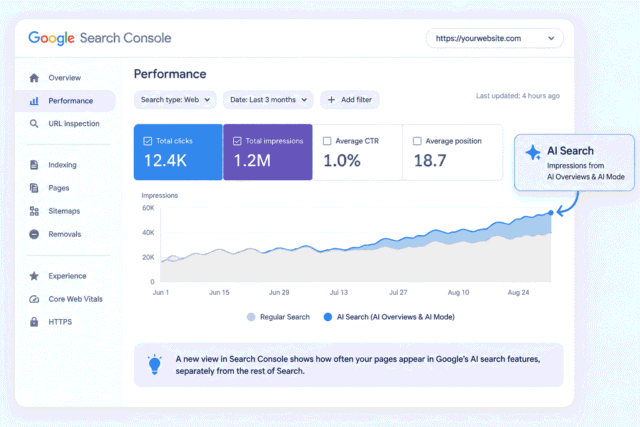
Pick 1 page today. Read it as if 5 of its sentences might be copied out and shown to someone without the surrounding paragraphs. Find the sentences that fail that test, rewrite them so they answer the question on their own, then use Search Console to see how AI search is sending traffic.


Leave a Reply