
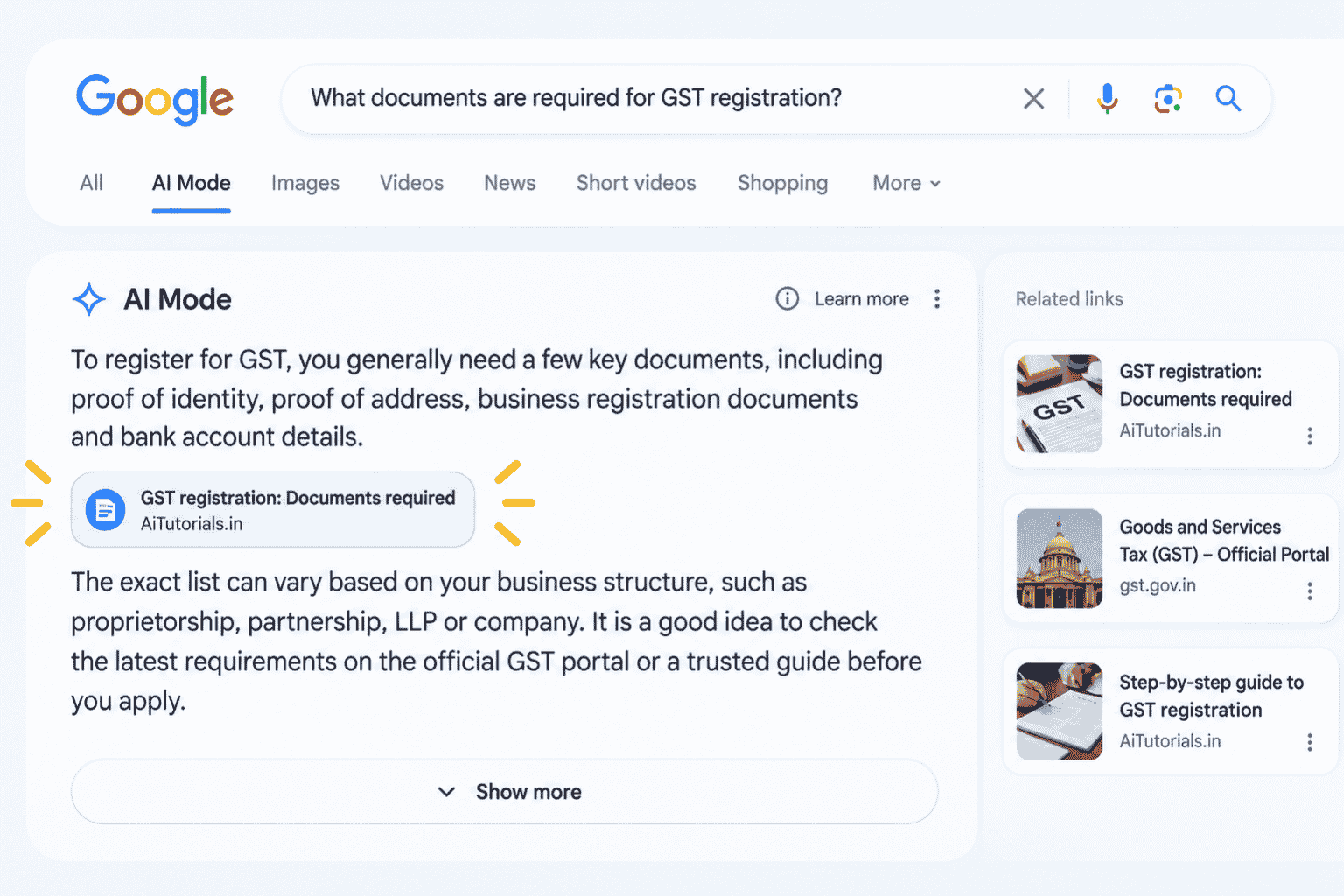

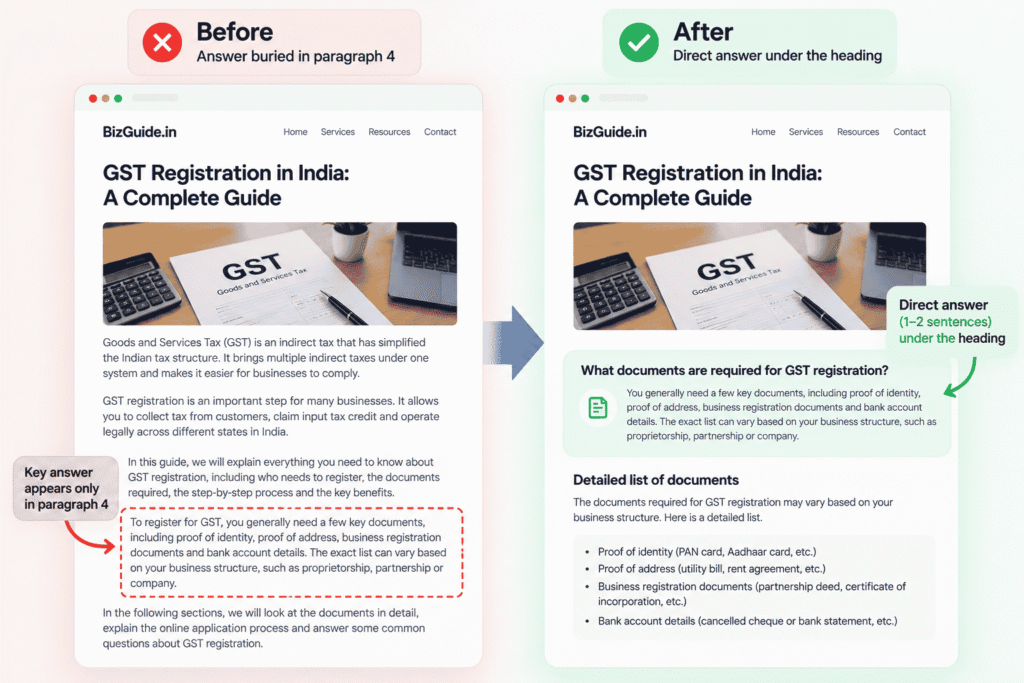
Your manager forwards Google’s 15 October 2026 announcement with one line: “Links show higher in AI Mode now. Can we get in?” You open ChatGPT and type, “Rewrite our GST registration page so it ranks in Google AI Mode.” Back comes 900 words, starting with “Discover everything you need to know about GST registration in this comprehensive guide.” The actual answer, which documents you need, has slipped to paragraph 4. The page is longer now. It is not any clearer.
The problem was never a missing AI Mode trick. Google says there isn’t one.
What changed in AI Mode on 15 October 2026
On 15 October 2026, Google announced that inline links in AI Mode and AI Overviews would appear higher in answers and more often. The change makes it easier for people to find and visit the websites behind an AI-generated answer.
Inline links are links placed inside the words or phrases of an answer. Google also announced several other changes:
- Image thumbnails for links: Links shown at the end of some AI answers are getting a more visual presentation, helping people identify pages they may want to open.
- More news carousels: Carousels highlighting Preferred Sources are expanding to more locations and languages, giving people more ways to find timely articles.
- A test for official websites: Google is testing a section at the top of some answers that highlights 1 or 2 official websites for completing a task or finding specific information. This is a test, not a guaranteed feature for every search.
- A test for creator links: Google is also testing clickable creator names on video results. These can lead people to creator profiles in Search.
Google did not name the specific countries receiving the link changes in its announcement. Do not assume that every change is already available to every searcher in India.
You can read the details in Google’s announcement about the October AI Mode and AI Overviews updates. 9to5Google’s report on the changes also distinguishes the tests from the other updates.
Is “AI Mode SEO” a separate thing? What Google says
No. Google’s documentation says there are no additional requirements or special optimisations needed to appear in AI Mode or AI Overviews. The same SEO fundamentals still apply.
A page must be indexed by Google and eligible to appear with a snippet in Google Search before it can qualify as a supporting link in these AI experiences. Meeting those requirements does not guarantee that Google will show your page.
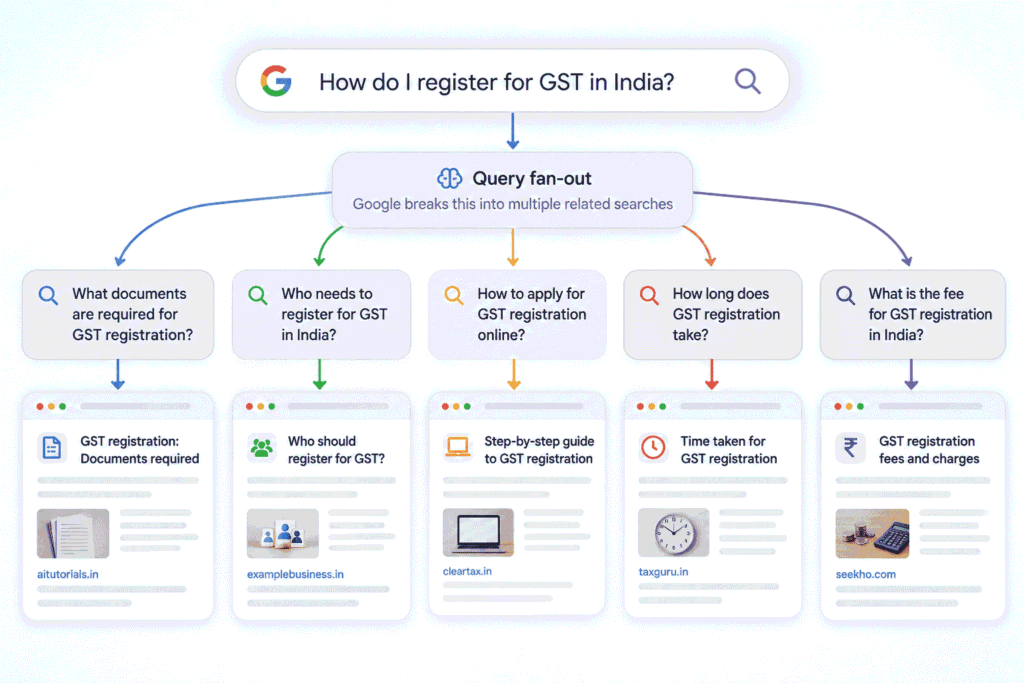
Google’s AI features use its existing Search systems to find relevant information. AI Mode may also use a process called query fan-out, in which it runs several related searches to build a broader answer.
Think of a librarian who receives one big question and splits it into 5 smaller questions. The librarian looks for a useful page for each question, then brings the information together. Query fan-out works along similar lines: a broad search can lead to several related searches, which may surface a wider mix of pages.
If you want to understand this process in more detail, read our beginner’s guide to Generative Engine Optimization. A separate guide to query fan-out will cover the process in greater depth once published.
Honestly, if someone is selling you a guaranteed “AI Mode ranking”, ask them to show you where Google promises that result. Google’s own documentation on AI features and websites says no special optimisation is required. No prompt, schema addition or agency package can guarantee a link in an AI answer.
What you can actually control on your page
There are 4 things on your page you can check, and all 4 are part of ordinary SEO. Start with technical eligibility, then look at whether the content answers the reader’s questions clearly.
| Thing to check | Why it matters | How to check |
|---|---|---|
| The page is indexed | Google cannot use a page as a supporting link in AI Search if it is not indexed. | Use URL Inspection in Google Search Console to check the page’s indexing status. If it is crawled but not indexed, follow our guide to Crawled, Currently Not Indexed before making content changes. |
| The page is allowed to show a snippet | A page blocked from showing a snippet may not qualify for these AI experiences. | Check whether a nosnippet directive or another preview control restricts the page. Our guide to Google’s AI Search opt-out choices explains the trade-offs. |
| Each important question has a clear answer in text | Readers should not have to search through a long introduction to find the information they need. | Read each heading and the paragraph immediately below it. Check whether the answer is direct, specific and available as text rather than only inside an image or video. |
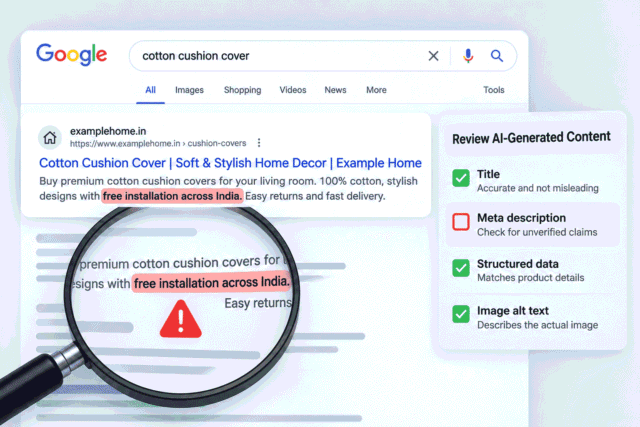
| Structured data matches visible content | Structured data helps describe a page, but it must accurately reflect what people can see on it. | Compare the page’s structured data with its actual content. Do not add schema for information that is absent from the page. |
The third check is where a content editor can often make a useful improvement. A page may cover the right topic and contain all the required information, yet make readers work too hard to find the answer.
For example, a GST registration guide might explain the process across several paragraphs before listing the documents a business owner needs. A reader looking for that list should not have to dig through the introduction.
Clear answers make the page easier to use. They are good content practice, not a promise of an AI Mode link.
Fix 1 page in 15 minutes with a better prompt
The quickest useful change is to put a direct answer of 1 to 2 sentences under each heading that represents a real question your page answers. You can use AI to help with the editing, provided you give it the actual page content and check its work.
Step 1: Collect 5 to 8 real questions
Use questions people actually ask, rather than asking AI to invent a list. Start with People Also Ask results for your main keyword and the Queries tab in Search Console for the page you want to improve.
Choose questions that match the page’s purpose. For a GST registration guide, these might include questions about the documents required, who needs to register and how to apply, provided those questions are relevant to the page.
Keep a note of where each question came from. You will paste that information into the prompt so the AI knows these are real search questions, not guesses.
Step 2: Run the prompt
A vague request gives the AI too much freedom to change your page. A better prompt tells it which questions matter, what it can use as evidence and exactly how to present its suggestions.
Here is the kind of prompt a busy SEO executive might start with:
Rewrite this page so it ranks in Google AI Mode: [paste page]Now use the improved version below. Replace the placeholders, paste the complete page and include your list of real questions.
You are editing a page for [business type] in India. The readers are [describe the intended audience, for example, small business owners filing GST for the first time].
PAGE TEXT:
[Paste the complete existing page here.]
REAL SEARCH QUESTIONS:
1. [Question 1] | Source: [People Also Ask or Search Console]
2. [Question 2] | Source: [People Also Ask or Search Console]
3. [Question 3] | Source: [People Also Ask or Search Console]
4. [Question 4] | Source: [People Also Ask or Search Console]
5. [Question 5] | Source: [People Also Ask or Search Console]
6. [Question 6] | Source: [People Also Ask or Search Console]
7. [Question 7] | Source: [People Also Ask or Search Console]
8. [Question 8] | Source: [People Also Ask or Search Console]
RULES:
- For each question, find the existing heading where it belongs.
- Write a direct answer of 1 to 2 sentences, under 40 words, to go immediately under that heading.
- Use only facts already present in the page text.
- Do not add new claims, numbers, requirements, deadlines or offers.
- Do not rewrite any other part of the page.
- If the page does not contain the answer, write NOT ON PAGE instead of guessing.
- Keep each answer relevant to the exact question.
- Do not claim that any answer will guarantee visibility in Google AI Mode.
OUTPUT:
Return a table with these columns:
1. Question
2. Heading it goes under
3. Answer sentence
4. Page line it came from
For every answer, identify the exact sentence or passage in the supplied page that supports it. If no passage supports the answer, write NOT ON PAGE.
Step 3: Check every answer against the page yourself
Do not copy the AI’s output straight into your website. Open the original page and verify every proposed answer against the passage it identifies.
Here is a generic example of how the output might look. These rows illustrate the review process, not verified GST advice.
| Question | Heading it goes under | Answer sentence | Page line it came from |
|---|---|---|---|
| Which documents does the page say are required for GST registration? | Documents required for GST registration | The page lists [the exact documents named in the existing content] as the documents required for registration. | Existing page sentence listing those documents. |
| How long does GST registration take? | How long does GST registration take? | NOT ON PAGE | NOT ON PAGE. The supplied page contains no statement about the registration timeline. |
The first row is valid only when the page contains the document list. The second row shows what the AI should do when evidence is missing. It must not invent a timeline to make the answer look complete.
If a question returns NOT ON PAGE, decide whether the page should answer it. If it should, research the answer and have a person verify the facts before adding new content. If the question does not belong on that page, leave it out.
Step 4: Add the answers and keep the rest of the page
Once you have checked the suggestions, add the approved answers under their existing headings. Keep the rest of the page intact unless you identify another clear content problem.
Read the updated page from the user’s point of view. Can someone find the answer without reading every paragraph? Does each answer agree with the explanation that follows? Have you accidentally introduced a new claim?
This exercise can improve clarity and make the page easier to understand. Google does not promise that adding short answers will earn your page a link in AI Mode.
What not to do
Avoid changes that make your page longer or more complicated without solving a reader’s problem.
Asking AI to rewrite the entire page for AI Mode can remove useful material and replace direct answers with generic introductions. Keep the parts that already work.
Adding extra structured data in the hope of unlocking AI Mode is also unnecessary. Google’s documentation says there is no special schema required for these features.
And be cautious about services promising guaranteed AI Mode rankings. A provider can help with technical SEO and content quality, but it cannot guarantee that Google will select a particular page for an AI answer.
Try it on your most important page today
Choose the 1 page on your website that matters most for leads or sales. Find 5 real questions using People Also Ask and Search Console, run the improved prompt, and verify every answer against the existing content. Publish only the changes you have checked. You do not need to rewrite the whole website to start.
Frequently Asked Questions
How does SEO work on AI Mode?
SEO for AI Mode relies on the same core Search systems and technical requirements used by Google Search. Your page needs to be indexed and eligible to show a snippet, while clear, useful content helps readers find the information they need. None of these steps guarantees a link.
Is traditional SEO still important after AI Mode?
Yes, traditional SEO remains important because Google’s AI Search features rely on its existing Search systems and index. Keep working on crawlability, useful content, internal links and accurate page information. A separate guide to whether SEO is dead is planned for publication in November 2026.
How to measure SEO in Google AI Mode?
As of October 2026, Google Search Console provides a Generative AI performance report for Search that includes impressions from AI Mode and AI Overviews. The report can help you examine visibility by page, country, device and date, but it does not provide a guarantee of traffic or rankings.
How do I open Google AI Mode?
As of October 2026, Google’s India-facing AI Mode page provides a “Try it now” link to open the experience. You can start at Google’s official AI Mode page for India. The exact controls available in Search may vary by device, account and rollout.
Leave a Reply